Canva: Level up your work effortlessly
I've had an amazing career using creativity and design throughout all my roles. From brand, marketing and communications to product development and management, I spent years mastering Adobe tools because that was the only way to get the files and visuals I needed. Then Canva came along, and I watched it grow from a simple print design tool into something that genuinely supports the way I work. Now, in the mix of ever-changing "common tools", CRMs and ERPs, Canva is part of my daily toolkit for presentations, communications, concept visuals, and even video. This is not a marketing pitch. It's an honest take from someone who's lived the Adobe (and Microsoft) grind and found a better way. The bigger shift I've noticed is that Canva doesn't feel like a basic time saving design tool anymore. It's started handling the whole run from "here's a rough idea" to "here's something ready to publish", which used to be where projects actually stalled. If your job involves turning half-formed ideas into something a team can ship, that's a meaningful thing to have in your corner, whatever your title is. by Lucas Gabriel ©2026
The Old Problem: Design Bottlenecks and Budget Limits
When I started in product management, every deck, roadmap visual, or quick mockup meant submitting a design ticket and waiting. Sometimes the wait was days, sometimes weeks. Budgets for design were tight, and hiring a designer wasn’t always an option. I had to learn Adobe tools to fill the gap, but that came with a steep learning curve and time costs. Adobe was powerful but not always practical for quick, iterative work.
Then Canva entered the scene. At first, I saw it as a tool for simple flyers and business cards or simple designs for social posts, nothing serious. But over time, it evolved. Features like Canva AI 2.0 and Magic Eraser improvements have shifted it from a basic design app to a creative operating system. Suddenly, I could create professional visuals, presentations and improve documents without waiting or needing advanced skills.
How Canva Fits into Product Management
For product managers, the ability to communicate clearly and quickly is crucial. Canva lets me build decks, roadmap visuals, and stakeholder communications without requesting or scheduling design help. Here’s how it works in practice:
Decks and Presentations: Canva’s templates are easy to customise, and I can quickly add charts, icons, and images that look polished. The Magic Eraser tool helps me clean up images without jumping into Photoshop.
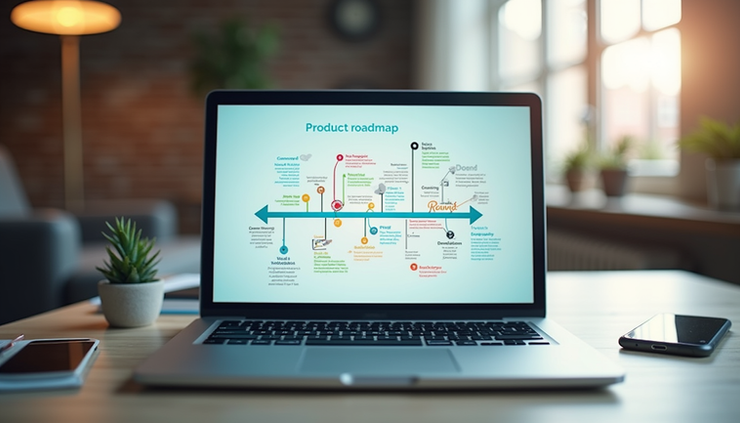
Roadmap Visuals: Instead of static spreadsheets, I create visual roadmaps and diagrams that are easy to update and share. Far more dynamic and engaging than the basic "common" software. Canva’s drag-and-drop interface means I can iterate on the fly.
Quick Concept Mockups: When I need to show a new feature idea or user flow, Canva lets me mock up screens or diagrams fast. No design ticket needed, which speeds up feedback cycles.
The recent AI improvements in Canva 2.0 help me generate ideas or refine visuals when I’m stuck. For example, I can use AI to suggest layouts or even generate text snippets for communications, saving time and improving clarity. And the Brand kit functions help me to keep on style without upsetting the brand or marketing department.
Communications, Marketing, and Social Made Faster
Canva isn’t just for product teams. Communications and marketing pros I work with use it to create campaign assets and on-brand templates at speed. The direct publishing integrations mean they can push content straight to platforms without extra steps.
Some practical uses include:
Campaign Assets: Quickly adapting templates for different channels while keeping brand consistency.
On-Brand Templates: Marketing teams build reusable templates that anyone can update, reducing bottlenecks.
Direct Publishing: Canva’s integrations with platforms like Facebook, LinkedIn, and Twitter let teams publish without exporting files or juggling multiple tools.
Presentations and stakeholder decks: going from a rough structure to something polished enough for an executive audience or event, without a design review cycle.
Concept visuals: mocking up an idea well enough that stakeholders react to the concept, not to placeholder graphics.
Video and animation: Canva's Video tools are easy to build and edit short videos, the gold standard in content. Now, other features from the Canva AI features handle things like entire text to video clips or animating a still photo, which used to mean complex, separate systems entirely.
This speed and flexibility mean marketing campaigns can move faster and stay aligned with brand guidelines without needing a designer for every tweak.

Canva as a Connected Layer in MarTech
Canva is no longer just a design tool. It’s becoming a connected layer in the marketing technology stack. For those in MarTech-facing roles, this matters because it bridges the gap between creative work and operational workflows. Canva is constantly evolving, launching new features and options. Plus, for my money, you can't find a better deal.
AI Research-to-Design Workflows: Canva’s AI tools help turn research insights into visuals quickly. For example, you can input data or text and get design suggestions that match your brand.
Integrations with Existing Tools: Canva connects with platforms like Slack, Google Drive, and HubSpot, making it easier to embed design work into daily workflows.
Image to Video: This feature lets teams turn static images into short videos without needing specialist software, perfect for quick social or internal comms.
This connectedness means Canva supports not just design but the entire process of creating, sharing, and publishing content. It’s a practical advantage for anyone managing marketing tech stacks or looking to reduce friction between teams.
Anyone who has any kind of engagement within their role, either internal or external, should know the importance of good content. With Canva, you simply level up that capability. If you need more impact, more lasting effect with the message, brand, or idea you are projecting, Canva gives you an edge.
Who Benefits Most from Canva?
This isn’t just for designers. Canva works for anyone who needs professional-looking output fast. That includes:
Product Managers who want to communicate ideas clearly without design delays.
Communications Teams needing quick, polished assets for internal and external messaging.
Marketing Leaders who want to maintain brand consistency while moving fast.
Project Managers and Admins who create reports, presentations, or event materials.
Designers who want to speed up routine tasks or collaborate with non-designers.
The common thread is speed and quality without the usual bottlenecks. Canva lets you focus on the message, not the tool.
It's for anyone doing project, product, admin, comms, marketing, or design work who needs professional-looking output on a normal working timeline: a PM who needs a roadmap visual by end of day, a comms lead who needs five on-brand social tiles before lunch, a social media manager juggling formats across six platforms, or a founder who needs a pitch deck that doesn't look like a basic template pitch deck.

Why I Keep Coming Back to Canva
I’m not here to sell Canva. I’m here because it works for me every day. It saves time and lets me produce professional visuals without needing to be a designer or wait for one. The constant improvements, like Canva AI keep it relevant and useful.
Canva fits into how I work, not the other way around. It’s flexible enough to handle everything from quick mockups to polished presentations and even video editing and content. That’s why it’s become a secret weapon for product managers and many others.


